
This guide walks you through how to properly set up Instagram clones step-by-step. It is designed to help you create and manage multiple accounts more safely and efficiently, especially if you are running automation or scaling your setup.
This only applies to real-device automation, since you need physical Android devices in order to install and run Instagram clones. The software our team uses, along with our partners, is Onimator. You can view the link below.
In case you are unfamiliar with any of this subject matter, I highly advise that you carefully read through the “Ultimate Instagram Marketing Guide” first. That guide will help you understand the purpose of cloning Instagram applications, why it is used, and how it fits into the overall automation setup so that everything in this section makes more sense when you follow along.
Disclaimer: While this guide is designed to significantly reduce the chances of suspensions and maximize account performance, it’s important to understand that occasional bans or restrictions may still occur, even if all steps are followed perfectly. Instagram frequently rolls out new updates and algorithm changes that can affect account behavior. The purpose of this guide is to help limit these risks and keep your accounts running at optimal speed.
In case you are here just for the resource links to actually be able to clone Instagram applications, I will list them below.That being said, I highly suggest that you carefully read through this entire section so you understand exactly why there are different cloning methods available, and why some methods are more streamlined than others.This is quite important because if you move forward with one option without fully understanding the differences, you may end up choosing a method that doesn’t actually make sense for your setup. If that happens, you’ll most likely end up coming back to this section again anyway, so it’s better to carefully read everything from the start and understand which option fits your needs best.”
Anyways, here are the resources. You can check them out and go through their respective home pages if you want to explore them right away. However, I still highly suggest that you come back to this section afterward and carefully read through everything else so you fully understand the significance of each platform, the differences between them, and how those differences can significantly impact your automation setup overall.
Go ahead and read through this section so you understand the purpose behind each alternative App Cloner and what each option is actually best used for. Once you’ve carefully gone through everything, come back to this section and continue reading the “Setting Up Instagram Clones” guide so you can begin properly preparing your automation setup
Step 1. Connect Devices Using Screencasting Software
To efficiently manage multiple Instagram clones, you’ll need to connect your phones to a computer and use screen-casting software. This setup allows you to control and view all of your devices from a single screen, making the entire process much easier to manage. We personally recommend using a tool called CrownScreens. The software allows you to view and interact with all of your connected devices in one place, making the process of downloading, setting up, and managing Instagram clones across multiple devices much more seamless and streamlined.

Step 2: Choose your Cloning Method
Next, I’m going to assume that you already went through the section explaining the different types of App Cloners available. Once you decide which option best fits your situation, go ahead and begin installing your Instagram clones. Our agency personally uses Nomix Cloner because it is much more streamlined when it comes to downloading and managing clones across a large number of devices.
That being said, you can still choose to use the cracked version of App Cloner. However, like I mentioned in this section here (INSERT CLONER SECTION WHERE I TALK ABOUT EACH CLONER IN DETAIL), there are several risks associated with using the cracked version:
A: It may not work properly on newer Android versions, especially devices running Android 10+
B: Download links are constantly getting removed and re-uploaded, meaning the links can randomly stop working
C: Since it’s a cracked version, there is no guarantee the application will remain updated or maintained long term because there is no official development team continuously updating the software
With all of that being said, your best options right now are typically:
- Nomix Cloner (roughly $99/month)
- Or purchasing App Cloner Ultra, which is around a $2500 USD upfront cost plus additional subscription costs depending on the features you need
In case you want to understand the specifics behind App Cloner and the differences between each option, you can refer to this section here: (APP CLONER SECTION).
That being said, App Cloner is genuinely a very powerful and well-built tool because it not only allows you to create Instagram clones, but also clone many other applications while giving you access to advanced cloning features and customization settings.
However, I still believe Nomix Cloner makes the most sense for many agencies starting out. In fact, many larger agencies still use it today.
The main difference between Nomix Cloner and the paid version of App Cloner is that with Nomix, you are generally focused more on managing and running existing accounts, whereas the full version of App Cloner provides more advanced functionality related to creating and configuring brand-new account environments.
That being said, for roughly 95% of the agencies we work with, the standard approach is simply purchasing aged Instagram accounts instead of creating brand-new ones manually. This makes the entire setup process much more streamlined overall. In addition to that, aged accounts generally perform better and tend to have lower suspension rates because they already have some level of trust and history established with the platform.
Below are the links to all the App Cloners and the places where we personally source our Instagram accounts from:
Step 3: Selecting the number of clones to create.
In the “Account Warmup & Safe Login” Guide (Insert Embedded URL), you probably noticed that I mentioned most agencies typically run anywhere between 8–12 accounts per device. Even though there is no hard limit physically stopping someone from installing 100+ clones on a device, it simply isn’t the most optimal approach to run that many profiles on a single phone.
Typically, 1 account = 1 Instagram clone/container, since each profile should ideally have its own isolated Instagram clone.
The primary reason we recommend staying within the 8–12 range is because you want the accounts you currently have to be able to sufficiently run and perform actions for a reasonable amount of time throughout the day. In the case of 12 accounts per device, this usually allows each account to run for roughly 2 hours within a 24-hour period. For example, our team personally runs 12 accounts per device. Since there are 24 hours in a day, this allows each account approximately 2 hours of runtime to perform actions.
Could we add more accounts and simply reduce the amount of runtime each account gets? Yes, technically we could.
However, from our own testing, we noticed that doing this often doesn’t provide much additional benefit. In many cases, it simply means another account is performing actions that the original accounts could have already handled themselves.
The reason agencies run 8–12 accounts to begin with is because if you only run 3–5 accounts per device, those accounts will usually hit their daily action limits much earlier within the day. Once that happens, the device ends up sitting idle for long periods of time with unused runtime capacity. By adding another 7–9 accounts per device, we allow more profiles to continue performing actions throughout the day without crossing the point where adding additional accounts becomes counterproductive.
The goal is really about finding the optimal balance: You want to maximize the amount of productive runtime the device has available, while avoiding the point where adding more accounts starts negatively affecting the setup overall. In addition to that, we also noticed that anytime we exceeded roughly 16 accounts per device, some of the profiles would start getting flagged more often.
Our team isn’t entirely sure what specifically causes that behavior, but it’s something we consistently noticed during testing. Because of that, it simply makes more sense to stay within the safer 8–12 account range and add another device if needed, rather than overload a single phone and run into avoidable issues later on.
Step 4: Watch the “Cloning Setup Videos” Below:
Watch thus video that explain how you can effeceitly make, download and organize your Instagram Cloning links so that you can streamline this process when Installing clones to your devices.
Demonstration Video #1:
Tip:
In the video, you’ll notice that once you create the Instagram clones using the Nomix Bot, you end up receiving download links for each clone. In the tutorial, the user transfers those download links to each device using a USB stick. That being said, a much more streamlined approach is to simply create a spreadsheet and paste all of the download links into it so you can stay organized. From there, using CrownScreens, you can simply copy and paste each download link directly into the browser on the device and download the Instagram clones from there without needing to use USB sticks at all.


After carefully watching the video, you should now have your Instagram containers ready to go, and you can begin logging in your profiles. From here, go over to the next section where I cover how to carefully log into accounts while reducing the chances of suspensions, human verification blocks, and captchas. That section is extremely important, especially because if the process is not followed carefully, you may end up with a higher issue rate than expected. It is vital that each step is followed as carefully as possible so we can minimize detection risks and perform automated tasks without putting the profiles at unnecessary risk.
In case you want to use the Cracked Version of App Cloner, you can go to this section here and view the entire setup process. In case you want to use App Cloner Ultra, you can also go to this section here and follow the full process. The setup process is actually quite similar to the Cracked Version of App Cloner. The main difference is that everything is more properly managed and monitored through App Cloner Ultra, especially since the development team provides official licensing and support for the application, rather than you simply downloading the APK directly from random browser sources like most people do with the cracked versions
Follow Us
Make sure that you:
- Follow our Telegram Channel to stay updated regarding new guide releases and major updates
- Bookmark our website: ToyBox.Marketing so you can easily access all the guides, tools, and resources we publish
- Follow our Instagram to stay up to date with new projects, tools, and services we plan on releasing
Here are all the links, services, and resources I mentioned throughout this guide; you can simply use this area as a central place to access everything directly and explore each section on its own.
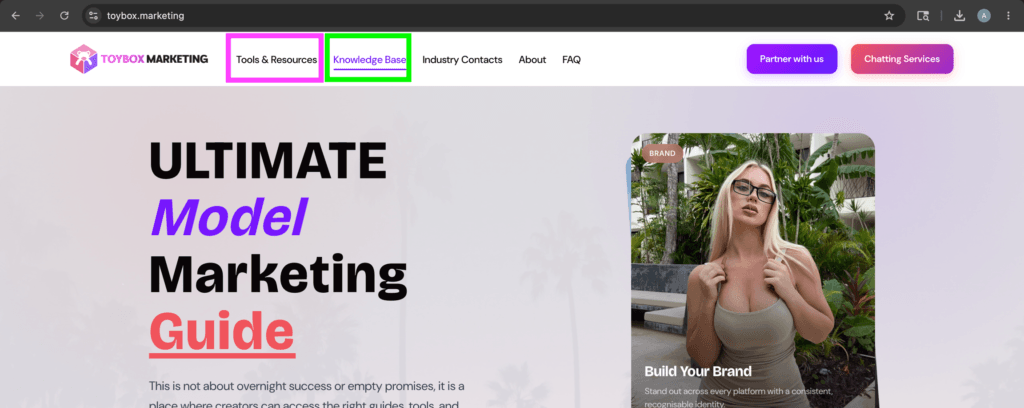
All of this information will also be available on our website, ToyBox.Marketing, inside the Knowledge Base section and the Tools & Resources section, where you’ll be able to access all of the links, guides, tutorials, and resources related to each topic all in one place
Main Guide Links and Resources
Ultimate Model Marketing Guide
This is an Instagram Automation Guide used by many of the top modeling agencies to promote their models…
Instagram Automation Software
Discount Code : ToyBox20
Instagram Account Supplier
Instagram Target Finder
Link-In-Bio Services
Discount Code : ToyBox10
Device Screen Mirroring Software
PhoneBox Supplier
Nomix Cloner
Proxy Equipment
Discount Code : TOYBOX10
Followers/Likes/Comment
Rental Proxies
OFM Jobs
Articles to Review and Read
Ultimate Instagram Automation Guide
This is an Instagram Automation Guide used by many of the top modeling agencies to promote their models…
Login & Warmup
This guide will walk you through step-by-step strategies for safely logging into Instagram accounts and properly warming them…
Setting up clones
This guide walks you through how to properly set up Instagram clones step-by-step. It is designed to help…
Profiling Accounts
This section is dedicated to actually “Profiling” the accounts and making them appear as natural as possible. This…
App Cloner Alternatives
In this section, you’ll get a clear understanding of why using an app cloning tool is important, the…
Proxies Section
Introduction In case you are here for the most optimal setup that most agencies use at this moment;…
Scraping Targets
Mass Targeting: In this section, I’m going to go over how you can use third-party tools to directly…
PhoneBoxes
Disclaimer: Before placing any orders from websites that sell PhoneBoxes, make sure that you do your own research…
Onimator Tutorial Section
In this section; I am going to add all relevant Onimator “Starting Up” Tutorials for you to reference.…
Recommended Proxy Setup
In this section; I am going to go over what I personally suggest you need right now in…