This section is dedicated to actually “Profiling” the accounts and making them appear as natural as possible. This is extremely important, especially when performing automation, since you want to avoid the profiles appearing spam-like and instead make them come across as real, active accounts.
In some cases, there are users who simply use blank profiles for mass direct messaging operations. However, in the case that you are using Onimator for traffic-based marketing strategies, then directing users from a secondary page to your main destination is going to require you to properly profile the accounts so that they appear as presentable and believable as possible. Since most of the agencies we personally work with are primarily using Onimator, I am not really going to get into mass direct messaging tactics within this guide. For now, this section is primarily going to outline different ways you can properly profile accounts so that you can effectively direct users to your intended destination.

In case you just want the most straightforward approach, the general idea is that you are going to want to create the secondary pages similar to your model’s primary page, while also making sure that you have a solid bio in place that helps direct users toward your final destination. Typically, you direct users to the destination by using dedicated links inside the bios of each account, which you can generate using services such as GetAllMyLinks.
For OnlyFans agencies specifically, setting the secondary accounts to “Private” can actually be very effective since it encourages users to immediately click through to the main account in order to view more content.
However, for users planning to perform automation in other niches, such as:
- Promoting a blog
- Promoting an ecommerce store
- Driving traffic to a local business
- Promoting a physical location
- Growing a personal brand
we will also go over different profiling approaches below that may work better depending on what type of audience you are targeting. In case you simply want the exact resources needed to:
- Purchase accounts
- Use dedicated bio links
- Add followers to the profiles
- Make the accounts appear more human-like
then you can refer to the services mentioned below. These are some of the primary industry-level resources that many agencies use when profiling accounts to help the profiles appear more natural and established.
ToyBoxAccounts: Where you purchase accounts for profiling and automation setups
Getallmylinks: The sevice that allows you to pruchase seeprate links in bulk for each account which is used to rpevent detection on Insatgram
ACCMarkets: Where you can purchase Likes; Followers and Comments to make the profile appear as prestnable as possible.
That being said, I highly recommend that you read the “Ultimate Model Marketing Guide” first so that all of the other things I mention throughout this section actually make sense and properly connect together.



Step 1: Purchasing Accounts
Your first step is going to be purchasing accounts. As mentioned multiple times throughout the guides, our team personally uses ToyBoxAccounts.com. We have been using them for over 2 years and have acquired well over 100,000 accounts from them across our setups.
That being said, you are free to use whatever supplier you want. We just personally use ToyBoxAccounts because we are partnered with them, and they offer multiple different account options, including:
- Blank accounts
- Accounts with followers already added
- Pre-profiled style accounts depending on availability”
Step 2: Warming up the Accounts
Our next step is to make sure that you carefully warm up the profiles. This is extremely important because if you skip the warmup process and immediately start profiling the accounts right away, there is a very high chance that the profiles can get:
- Flagged
- Suspended
- Hit with human verification checkpoints
In this case, I strongly suggest that you carefully read through our “Warmup & Safe Login Guide” first so that you understand exactly:
- When you can safely begin profiling the accounts
- How to properly warm them up
- How to minimize verification issues and suspensions during the process
Step 3: “Decorating” the Account
The primary things you want to consider when “Decorating” or profiling the accounts is whether you want the profiles to be set to “Public” or “Private.” In our case, most of the secondary accounts we created for our models were initially set to “Private” during the earlier stages of the setup process.
Later on, once our staff added:
- Images
- Posts
- Story highlights
- Bios
- Profile pictures
- General profile content
we would then slowly begin switching some of the accounts over to “Public” once the profiles appeared more complete and natural

Optimal Ways to Decorate the Accounts:
In terms of what the most optimal way is to actually:
- Change names
- Update usernames
- Add bios
- Insert links
- Upload posts and content
I personally recommend hiring VAs (Virtual Assistants), then having them remotely access your office computers using AnyDesk. From there, they can control all of the connected device screens using CrownScreens, which makes the entire profiling process much more streamlined and efficient when managing larger numbers of accounts

The reason CrownScreens is quite useful for profiling accounts is because it allows the user to directly upload images and videos from their desktop and then transfer them onto the connected devices without needing to use USB cables or manually transfer all of the files one-by-one.

This method is generally safer for the profiles as well since you are performing all of the profile changes directly inside the same Instagram containers and physical devices that are later going to perform the automation actions themselves. You can also experiment with other platforms such as GeeLark (device emulators). However, this is not something our team has fully tested yet, so it is not something we can confidently recommend at this moment. That being said, I still encourage you to check GeeLark out yourself and test whether you are able to successfully profile the accounts using their Device Emulator Dashboard.

Step 4: Adding Followers/Likes/Comments/Views
Many agencies prefer to add followers, likes, comments, and views to the content posted on their secondary accounts.
The reason for this is because it helps make the profiles appear much more “authentic” and less spam-like to the users viewing the pages. Many agencies have also documented that this helps improve what is known as “CTR” (Click Through Rate), which basically means they noticed a higher number of users clicking the links in the bios whenever the profiles appeared more human-like and established.
That being said, one panel that our team has personally been using for over 3+ years now is ACCMarkets.
You can check out their dedicated Followers/Likes/Comments/Views sections yourself and review the different engagement options and pricing they offer for helping profile accounts


At this point, you can really just set up the profiles however you want. The primary thing that I want to emphasize is making sure that you carefully prepare the accounts before you actually begin profiling and decorating them. In case that preparation process is not followed properly, there is a much higher risk that the accounts can get flagged during the profiling/customization process.
That being said, I highly suggest that you carefully go over the “Warmup & Safe Login Guide” first so that you fully understand the preparation required before you begin:
- Changing usernames
- Updating bios
- Adding links
- Uploading posts
- Changing profile pictures
- Fully customizing the accounts
Follow Us
Make sure that you:
- Follow our Telegram Channel to stay updated regarding new guide releases and major updates
- Bookmark our website: ToyBox.Marketing so you can easily access all the guides, tools, and resources we publish
- Follow our Instagram to stay up to date with new projects, tools, and services we plan on releasing
Here are all the links, services, and resources I mentioned throughout this guide; you can simply use this area as a central place to access everything directly and explore each section on its own.
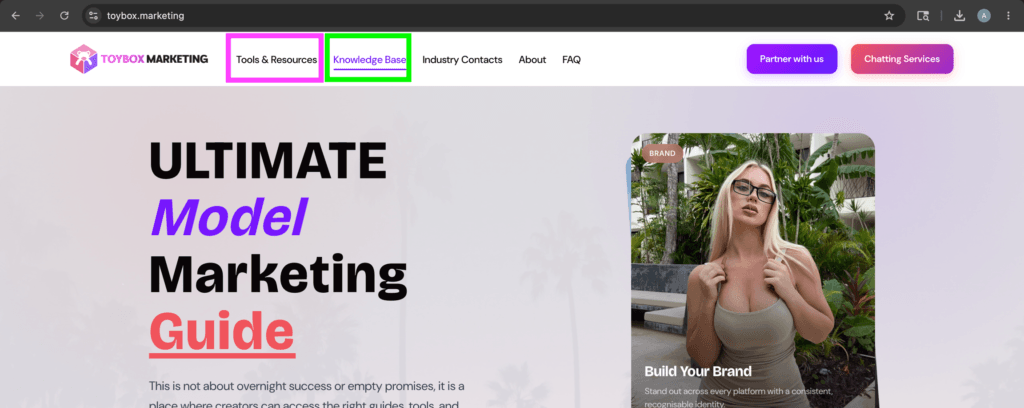
All of this information will also be available on our website, ToyBox.Marketing, inside the Knowledge Base section and the Tools & Resources section, where you’ll be able to access all of the links, guides, tutorials, and resources related to each topic all in one place
Main Guide Links and Resources
Ultimate Model Marketing Guide
This is an Instagram Automation Guide used by many of the top modeling agencies to promote their models…

Instagram Automation Software
Discount Code : ToyBox20

Instagram Account Supplier
Instagram Target Finder

Link-In-Bio Services
Discount Code : ToyBox10

Device Screen Mirroring Software
PhoneBox Supplier
Nomix Cloner
Proxy Equipment
Discount Code : TOYBOX10

Followers/Likes/Comment
Rental Proxies

OFM Jobs
Articles to Review and Read
Ultimate Instagram Automation Guide
This is an Instagram Automation Guide used by many of the top modeling agencies to promote their models…

Login & Warmup
This guide will walk you through step-by-step strategies for safely logging into Instagram accounts and properly warming them…
Setting up clones
This guide walks you through how to properly set up Instagram clones step-by-step. It is designed to help…
Profiling Accounts
This section is dedicated to actually “Profiling” the accounts and making them appear as natural as possible. This…
App Cloner Alternatives
In this section, you’ll get a clear understanding of why using an app cloning tool is important, the…
Proxies Section
Introduction In case you are here for the most optimal setup that most agencies use at this moment;…
Scraping Targets
Mass Targeting: In this section, I’m going to go over how you can use third-party tools to directly…
PhoneBoxes
Disclaimer: Before placing any orders from websites that sell PhoneBoxes, make sure that you do your own research…
Onimator Tutorial Section
In this section; I am going to add all relevant Onimator “Starting Up” Tutorials for you to reference.…
Recommended Proxy Setup
In this section; I am going to go over what I personally suggest you need right now in…